
StreetReady
One roster.
Easy to run.
StreetReady is the scheduling app for a company or an agency. Drag people across the week, hold the daily minimum, post overtime and day trades, then open the same day on a phone.
What StreetReady is
The roster your people will actually use.
StreetReady is scheduling software for a company or an agency that runs shifts. Supervisors manage who is working, who is off, and whether the day meets its minimum. Staff open the same board on a phone and see their own day next to their teammates.
One board for the people
Names, call signs, teams, and leave live together. The roster stops living in a spreadsheet and a group text.
Easy on the desktop website
The full week is one screen. Drag a person to another day. The minimum updates as you drop.
Then the phone
After the desk, each person sees their day and the teammates on their team.
On the website
The desktop is the easy view.
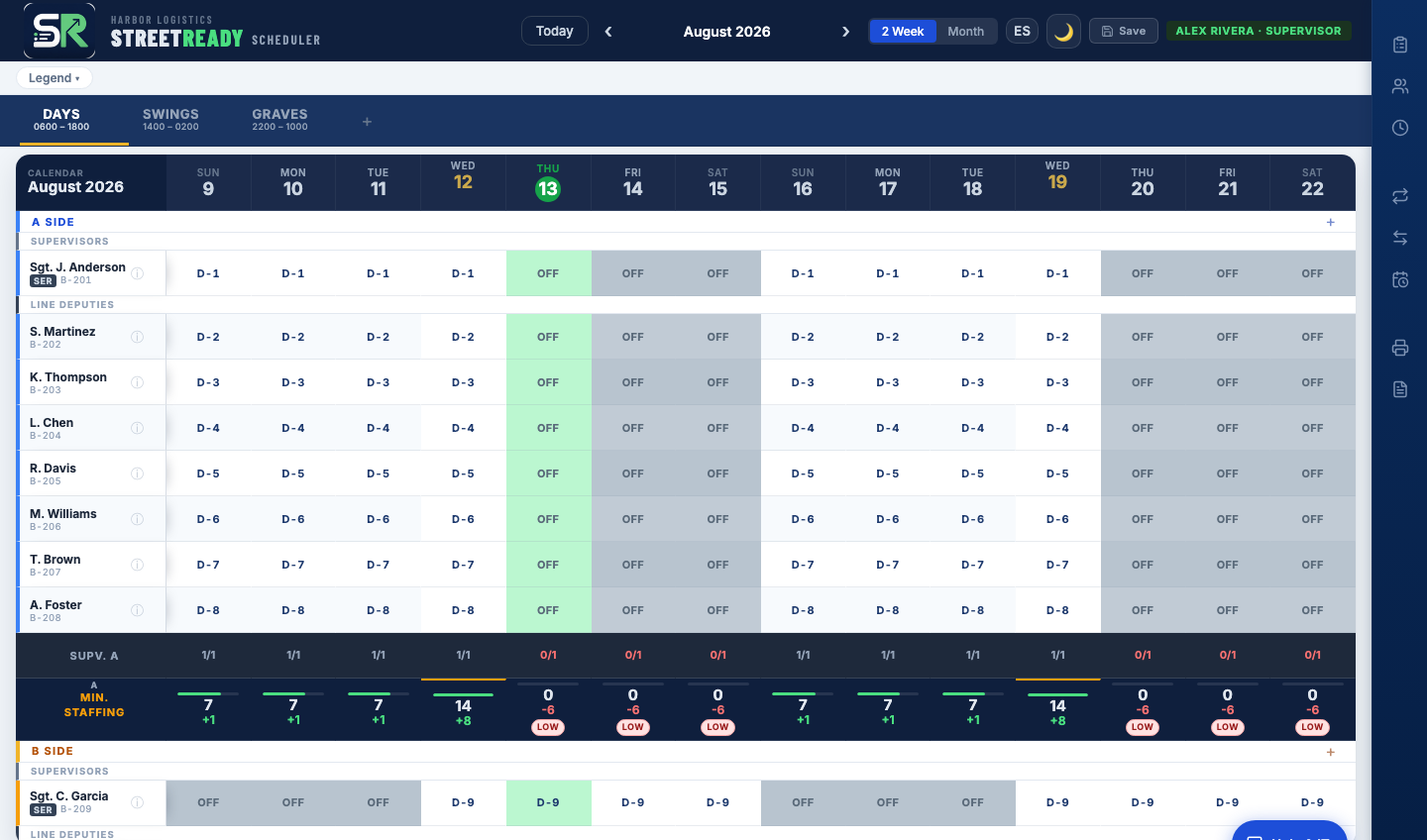
The full week sits on one screen. Drag a person onto another day. Call signs, teams, and leave stay on that grid. Under each day, green means the minimum is met and red means the shift is short.
What you are looking at
These are the real screens. Drag the week, set the daily minimum, post overtime, and approve a day trade — then the phone shows that same day.
Drag and drop the week
Move a person from one day to another. The week, the team, and the call sign stay on one screen.
Daily required minimums
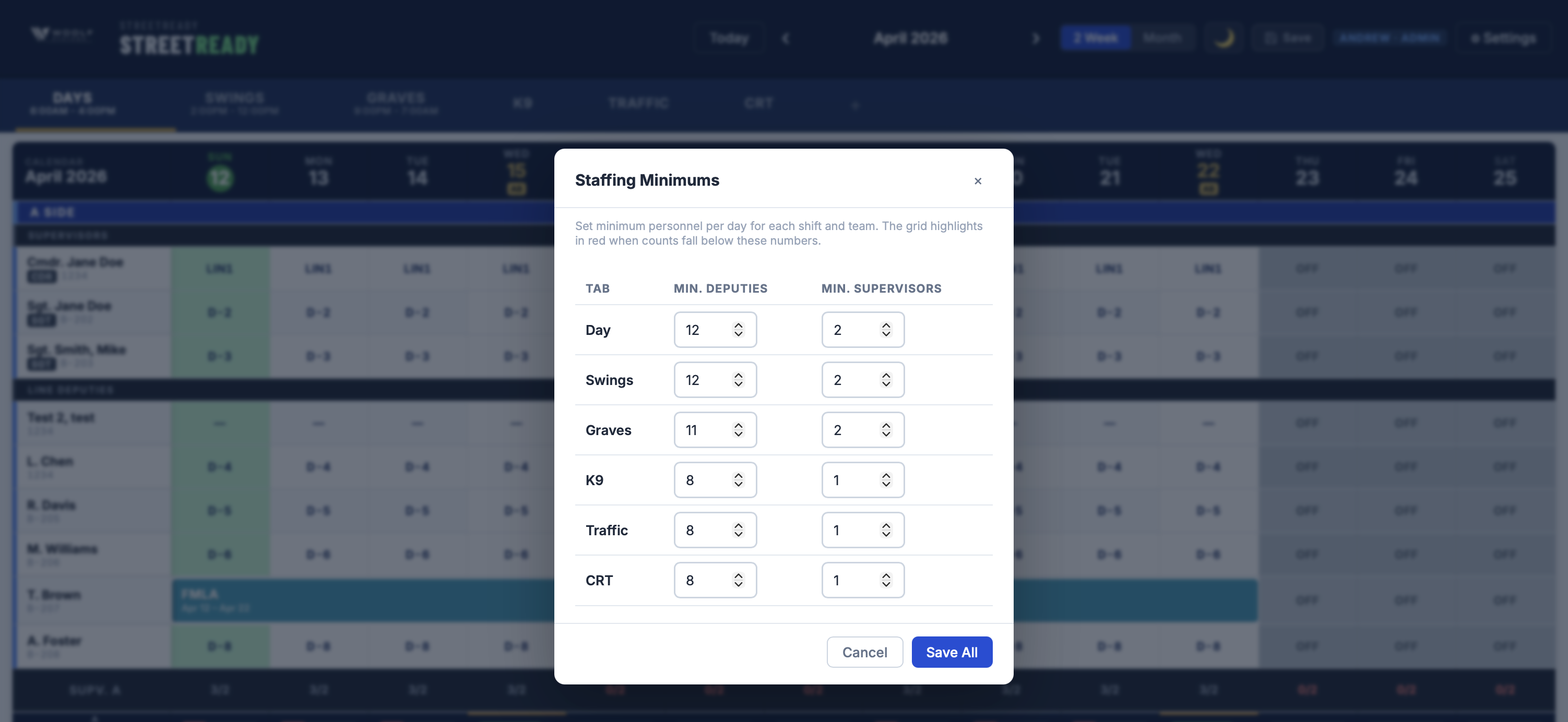
Set how many people a shift needs. The board turns red when the day falls short and green when it is covered.

Overtime board
Post an open slot, let people sign up, and approve the fill from the same desk.

Day trades
A swap between two people, with a pending line and a history, instead of a chain of calls.
For supervisors
They know before the shift starts.
When coverage dips, StreetReady emails the managers. Post overtime. Fill the spot. Approve it. The roster updates — no callback chain.
- Email when a shift goes low or runs long
- Post OT from the same phone screen
- Approve a signup and it writes to the week
Then the phone
Your day, and your teammates, in one hand.
The same roster, built for a phone. Open your day. See your assignment and the people on your team. Overtime and trades stay in the same menu, so nobody pinches a desktop grid between jobs.
Watch the walkthrough
From the desk to the phone, with a real narration.
Press play and leave the sound on. The film starts with what StreetReady is, walks the desktop, then the daily minimum, the overtime board, day trades, the phone, and how your own desk handles login help.
About a minute and fifteen seconds. English narration, American accent. Spanish captions are in the player.
Your own desk
Your company or agency handles passwords and login help.
Administrators add a person, issue a temporary password, reset a password, reset the authenticator, remove a passkey, and lock or unlock an account from the Accounts screen. People call their own desk. A forgotten password does not wait on a vendor ticket.
Passwords and passkeys
Reset a password or clear a passkey without sending the person outside your organization.
Authenticator and lockouts
Reset multi-factor sign-in, or lock an account when someone leaves the team.
Tied to the roster
Link the login to the person on the schedule, and change their role when the job changes.
A fraction of the enterprise price
Enterprise roster tools cost thousands a year. StreetReady does not have to.
UKG/Kronos-class schedulers and bloated HR suites are built for payroll empires, then sold as a roster. StreetReady is scheduling software — drag-and-drop coverage, alerts, overtime, trades, and leave — at a fraction of what those platforms charge each year. We do not publish a fake sticker price. Request a demo and we will quote your team.
Request a demo or quoteCustomize names so the product sounds like your shop.
StreetReady is not locked to one industry vocabulary. Administrators rename roles, ranks, shift names, and team tabs to match how you already talk on the floor.
Roles that match the work
Deputy, officer, technician, nurse, guard, operator — or whatever title your roster actually uses.
Ranks and shift names
Keep sergeant, charge, lead, Graves, Swings, or rename every label so new hires recognize the board on day one.
Team tabs for any org chart
Days, nights, units, floors, crews, sites — the week view follows your structure, not ours.
Security built for real operations.
CJIS-aligned controls, modern encryption, passkeys, and an audit trail — a security baseline for any team handling sensitive schedules, not only public safety.
CJIS Advanced Authentication
Every login requires TOTP multi-factor authentication from Google Authenticator, Authy, or any compatible authenticator app, supporting the advanced authentication expectations of CJIS Security Policy 6.0.
Passkey Support (FIDO2 / WebAuthn)
Phishing-resistant, hardware-backed sign-in via Touch ID, Face ID, Windows Hello, or YubiKey. No password to steal, no SMS to intercept. Passkeys are the strongest form of authentication available and are designed to support CJIS advanced authentication expectations.
FIPS 140-3 Encryption
Data is encrypted at rest with AES-256 and in transit over TLS 1.3, with controls designed around FIPS 140-3 encryption expectations. No plaintext credentials are stored or transmitted anywhere in the system.
RBAC & Immutable Audit Trails
Granular RBAC ensures people see only records their role permits. Every change is logged in an immutable audit trail — ready for security review.
CJIS 6.0-aligned · FIPS 140-3 encryption expectations · Passkey-ready · Zero plaintext credential storage
Who it's for
Any organization that runs shifts, tracks coverage, and needs a real audit trail — not only government, and not only public safety.
Hospitals and health systems
Nurses, techs, and unit leads get a live roster, leave in context, and alerts before a floor goes short.
Security, manufacturing, and field crews
Guards, operators, and crews across sites and shifts — with overtime and trades that do not live in a group text.
Public works and utilities
Coordinate large field crews across facilities, zones, and shifts — with real-time visibility into who is where.
Public safety and emergency services
Police, fire, EMS, and sheriff teams use the same product, with titles and ranks renamed to match the agency.
Frequently asked questions
How much does StreetReady cost?
StreetReady is a fraction of the cost of enterprise schedulers and bloated HR suites — the UKG/Kronos-class tools that routinely run thousands of dollars a year. We do not publish a one-size sticker price. Request a demo and we will quote your team.
Can we customize titles, ranks, and shift names?
Yes. Administrators rename roles (deputy, officer, technician, nurse, or your own titles), ranks, shift names, and team tabs so the product matches any industry — hospitals, security, manufacturing, field crews, public works, and public safety.
Is there a mobile version?
Yes. After the desktop week, the phone shows day cards for a single date: your assignment, your teammates, and whether the team is short. Overtime and trades are in the same menu.
Who resets passwords and helps with login?
Your own company or agency. Administrators add a person, issue a temporary password, reset a password, reset the authenticator, remove a passkey, lock or unlock an account, and link that login to the roster. People contact their own IT desk.
How is StreetReady secured?
StreetReady uses CJIS-aligned controls as a security baseline for any operator handling sensitive schedules — not only police. Data is encrypted with AES-256 at rest and TLS 1.3 in transit. Sign-in supports TOTP multi-factor authentication and passkeys (Touch ID, Face ID, Windows Hello, YubiKey). Role-based access and an immutable audit trail record every change.
How does drag-and-drop scheduling work?
Supervisors move personnel between shifts and dates with a single gesture. The system validates coverage and flags conflicts in real time. Day trades, leave, and call signs are all managed from one interface — pure scheduling, no payroll processing.
How does StreetReady detect understaffed or overstaffed shifts?
The staffing alert engine lets admins set LOW and SURPLUS thresholds per shift. Every roster save compares scheduled headcount against those thresholds. Supervisors get branded email alerts within seconds and see inline red/amber badges on-screen in real time.
What is an overtime board and how does it work?
When a shift goes LOW, supervisors post an OT slot from the same screen. Eligible staff see open slots, sign up with one click, and supervisors approve or deny. Every step triggers an email. Approvals update the live roster immediately. Every action is logged in the immutable audit trail.
Who makes StreetReady and where is Woolf Systems based?
StreetReady is built by Woolf Systems LLC, an American software company founded in 2026. We build roster and shift-scheduling software for any team that runs shifts. Our team supports customers in English and Spanish across the United States. We are not affiliated with any government agency.
Ready to schedule without the enterprise price tag?
See how StreetReady fits your hospital, plant, crew, or agency in a personalized demo — then get a quote.
Request a DemoGet in touch
Tell us about your team and we'll follow up to schedule a demo or send a quote.